



What is “Sumify”?
Sumify is the first and only app that allows merchants on the Salla platform to showcase their products through an interactive online auction system directly within their store. It’s designed to engage customers and maximize sales by enabling bidding and selling at the highest possible price.
⸻
Key Features:
• Easily convert any product into a live auction within the store.
• Set the start and end time for each auction.
• Send automated notifications to bidders with real-time price alerts.
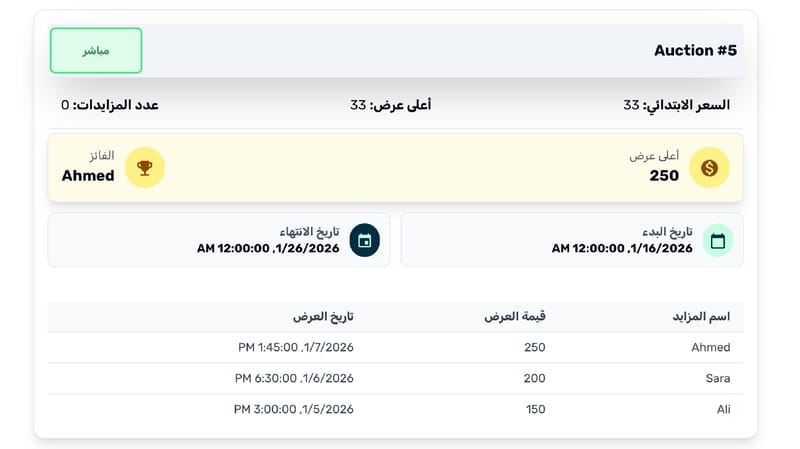
• View detailed analytics on auction performance.
• Automatically display a dedicated “Auction” section in the storefront.
⸻
Steps to Install the Sumify App:
1. Install the App
Click on “Install” — a 7-day free trial will be activated automatically.
Then, review the required permissions and approve them.
2. Activate Your Account
You’ll receive an activation email containing a verification link.
Click the link and select “Activate Account.”
3. Set a Password
Create a secure password for your account.
(You’ll need this password each time you log in to the control panel.)
4. Log in to the Control Panel
After setting your password, sign in to the dashboard via:
🔗 dashboard here
Next Step:
Proceed to the Auction Setup Guide:
🔗 here
⸻
How the App Works:
1. Once the app is installed, a Sumify account is automatically created.
2. Upon accessing Sumify, your store’s products are automatically synced.
3. You can create an auction by selecting a product, setting a starting price, and defining the auction duration.
4. When an auction is active:
• The “Add to Cart” button is hidden.
• A new button, “Place a Bid,” appears, opening a window for users to submit their bid.
5. At the end of the auction, a payment link is automatically sent to the winning bidder via email and WhatsApp to complete the purchase.